Reference
Kite provides very basic set of APIs that would otherwise require user to manually manage lifecycle of some features. Our APIs include but are not limited to:
# Script Context
Various methods to identify context the script is running in.
# Event Listeners
Event listeners registered via Kite APIs are automatically unregistered when script is unloaded.
# Command Registration
Commands registered by Kite APIs are automatically unregistered when script is unloaded.
# Schedulers
Tasks registered by Kite APIs are automatically cancelled when script is unloaded.
Script Context
Various methods to identify context the script is running in.
// Name of the script.
val name: File

// Entry point file of the script.
val entryPoint: File

// Kite plugin instance.
val plugin: JavaPlugin

// Server instance.
val server: Server

// Logger instance.
val logger: ComponentLogger
Event Listeners
You can create an event listener using on<Event> function.
on<PlayerJoinEvent> { event ->
    if (event.player.hasPlayedBefore() == true) {
        event.player.sendRichMessage("<gray>Welcome back, <red>${event.player.name}!"))
    }
}

// Optionally, you an specify listener priority.
on<PlayerDeathEvent>(priority = EventPriority.MONITOR) {...}
You do not need to worry about event lifecycle as it is managed by Kite.
Command Registration
Non-complex commands can be created with little effort using built-in API.
All properties except for the command name are optional.
command("echo") {
    // Properties
    description = "Prints specified message to the sender."
    permission = "scripts.command.echo"
    usage = "/echo [message]"
    aliases = listOf("e", "print")
    // Command Logic
    execute { sender, args ->
        // Joining arguments to string using space as delimiter.
        val message = args.joinToString(" ")
        // Sending message back to the sender.
        sender.sendRichMessage(message)
    }
    // Command Completions
    tabComplete { sender, args ->
        return@tabComplete emptyList()
    }
}
You do not need to worry about command lifecycle as it is managed by Kite.
Schedulers
Using built-in extension functions for task scheduling is highly recommended. Tasks registered via Kite APIs are automatically cancelled when script is unloaded.
When using Bukkit or Paper API directly you need to take care of task lifecycle on your own.
BukkitScheduler
https://jd.papermc.io/paper/org/bukkit/scheduler/BukkitScheduler.html
Bukkit scheduler is the easiest scheduler to use. It allows scheduling synchronous and asynchronous tasks and is tied to server tick time. This scheduler is not compatible with Folia.
// Schedules a task to run immediately or after specified delay in ticks.
fun BukkitScheduler.runTask(delayTicks: Long = 0, task: (BukkitRunnable) -> Unit): BukkitTask

// Schedules an asynchronous task to run immediately or after specified delay in ticks.
fun BukkitScheduler.runTaskAsync(delayTicks: Long = 0, task: (BukkitRunnable) -> Unit): BukkitTask

// Schedules a repeating task to start immediately or after specified delay in ticks.
fun BukkitScheduler.runTaskTimer(
    delayTicks: Long = 0,
    periodTicks: Long,
    task: (BukkitRunnable) -> Unit
): BukkitTask

// Schedules an asynchronous repeating task to start immediately or after specified delay in ticks.
fun BukkitScheduler.runTaskTimerAsync(
    delayTicks: Long = 0,
    periodTicks: Long,
    task: (BukkitRunnable) -> Unit
): BukkitTask
Broadcasting an automated message every 30 seconds.
fun resetQueue(): ListIterator<String> {
    return listOf(
        "<dark_gray>› <gray>Don't forget to leave a star on Kite repository!",
        "<dark_gray>› <gray>Did you know you can access APIs of other plugins?",
        "<dark_gray>› <gray>Join our Discord: <click:open_url:'https://discord.gg/xYcjBKqkDz'><yellow>discord.gg/xYcjBKqkDz</click>"
    ).listIterator()
}

// Queue of automated messages.
var messagesQueue = resetQueue()

onLoad {
    // Scheduling a repeating task to run every 10 seconds.
    server.scheduler.runTaskTimer(delayTicks = 1 * 20, periodTicks =  10 * 20) {
        // Resetting the queue if it has reached the end.
        if (messagesQueue.hasNext() == false)
            messagesQueue = resetQueue()
        // Sending a random message from the list.
        server.sendRichMessage(messagesQueue.next())
    }
}
AsyncScheduler
https://jd.papermc.io/paper/io/papermc/paper/threadedregions/scheduler/AsyncScheduler.html
Async scheduler can be used to schedule tasks to execute asynchronously from the server tick process.
// Schedules an asynchronous task to run immediately.
fun AsyncScheduler.runNow(task: () -> Unit): ScheduledTask

// Schedules an asynchronous task to run after specified delay.
fun AsyncScheduler.runDelayed(
    delay: Long,
    unit: TimeUnit,
    task: (KiteScheduledTask) -> Unit
): KiteScheduledTask

// Schedules an asynchronous repeating task to start after specified delay.
fun AsyncScheduler.runAtFixedRate(
    initialDelay: Long = 0,
    period: Long,
    unit: TimeUnit,
    task: (KiteScheduledTask) -> Unit
): KiteScheduledTask
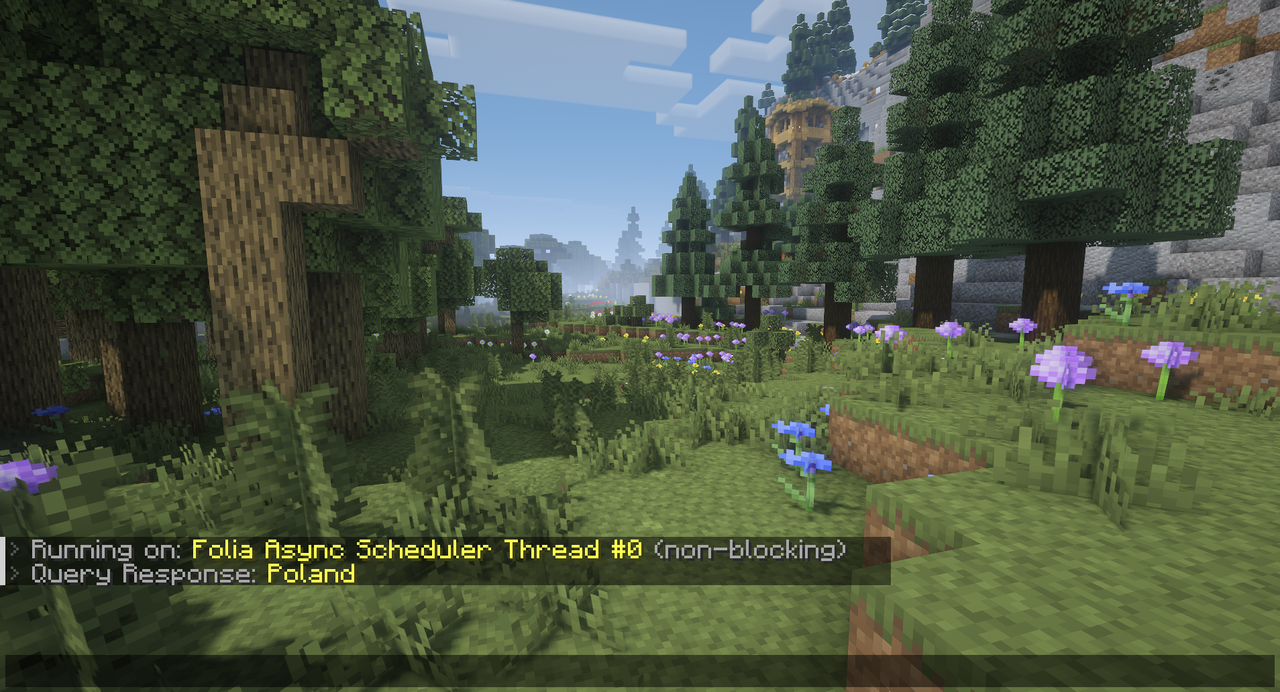
Command to asynchronously fetch country name using external get.geojs.io service.
import java.net.URI
import java.net.http.HttpClient
import java.net.http.HttpRequest
import java.net.http.HttpResponse

val client = HttpClient.newHttpClient()

command("what_is_my_country") {
    permission = "kite.command.what_is_my_country"
    execute { sender, args ->
        if (sender is Player) {
            server.asyncScheduler.runNow {
                sender.sendRichMessage("<dark_gray>› <gray>Running on: <yellow>${Thread.currentThread().name}<gray> (${if (Bukkit.isPrimaryThread()) "blocking" else "non-blocking"}<gray>)")
                // Creating and sending request that gets the country name from player's IP address.
                val request = HttpRequest.newBuilder().GET().uri(URI("https://get.geojs.io/v1/ip/country/full/${sender.address.address}")).build()
                val country = client.send(request, HttpResponse.BodyHandlers.ofString()).body().trim()
                // Sending response message to the command sender.
                sender.sendRichMessage("<dark_gray>› <gray>Query Response: <yellow>$country")
            }
        }
    }
}
EntityScheduler
https://jd.papermc.io/paper/io/papermc/paper/threadedregions/scheduler/EntityScheduler.html
Entity scheduler allows tasks to be scheduled and executed on the region that owns the entity. This is useful when dealing with entity teleportation, as once an entity begins an asynchronous teleport the entity cannot tick until the teleport has completed, and the timing is undefined.
// Schedules an entity task to run on the next tick.
fun EntityScheduler.run(task: (KiteScheduledTask) -> Unit, retired: () -> Unit = {}): KiteScheduledTask?

// Schedules an entity task to run after specified delay.
fun EntityScheduler.runDelayed(
    delay: Long,
    unit: TimeUnit,
    task: (KiteScheduledTask) -> Unit,
    retired: () -> Unit = {}
): KiteScheduledTask?

// Schedules an entity repeating task to start after specified delay.
fun EntityScheduler.runAtFixedRate(
    initialDelay: Long = 0,
    period: Long,
    unit: TimeUnit,
    task: (KiteScheduledTask) -> Unit,
    retired: () -> Unit = {}
): KiteScheduledTask?on<PlayerJoinEvent> { event ->
// Welcoming player to the server.
// NOTE: There is no need to schedule a task for that - this is just an example.
event.player.scheduler.run {
event.player.sendPlainMessage("Hello, ${it.name} to our server!")
}
// Kicking player after 30 seconds of playing on the server.
event.player.scheduler.runDelayed(30, TimeUnit.SECONDS, {
event.player.kick(Component.text("You were playing for more than 30 seconds... That's too long! Please take a break."))
})
// Adding one experience level to the player every 5 seconds.
event.player.scheduler.runAtFixedRate(5, 5, TimeUnit.SECONDS, {
event.player.level = event.player.level + 1
})
}GlobalRegionScheduler
https://jd.papermc.io/paper/io/papermc/paper/threadedregions/scheduler/GlobalRegionScheduler.html
Global region scheduler can be used to schedule tasks that will execute on the global region thread.
This scheduler falls back to the main server thread if not running Folia.
// Schedules a task to run on the next tick.
fun GlobalRegionScheduler.run(task: (KiteScheduledTask) -> Unit): KiteScheduledTask

// Schedules a task to run after specified delay.
fun GlobalRegionScheduler.runDelayed(
    delay: Long,
    unit: TimeUnit,
    task: (KiteScheduledTask) -> Unit
): KiteScheduledTask

// Schedules a repeating task to start after specified delay.
fun GlobalRegionScheduler.runAtFixedRate(
    initialDelay: Long = 0,
    period: Long,
    unit: TimeUnit,
    task: (KiteScheduledTask) -> Unit
): KiteScheduledTask